

How it works
Mocking is set on the agent and applies to every simulation on that agent. Live traffic is never mocked.- Open the agent’s Simulation Settings and turn on Mock tool calls. Every tool the agent has is listed.
- Pick a mode for each tool. Tools start on Generated.
- Run a simulation. Each tool call gets its answer from Bluejay.

For each tool call, Bluejay uses the first of these:
- The Digital Human’s Tool Response Overrides entry for the tool.
- The agent’s Fixed response for the tool.
- A generated result, unless the tool is on Real backend.
- Your real tool.
Override a tool for one test case
Edit the Digital Human and fill in Tool Response Overrides for the tool, as JSON or plain text. Leave it empty to use the agent’s mode.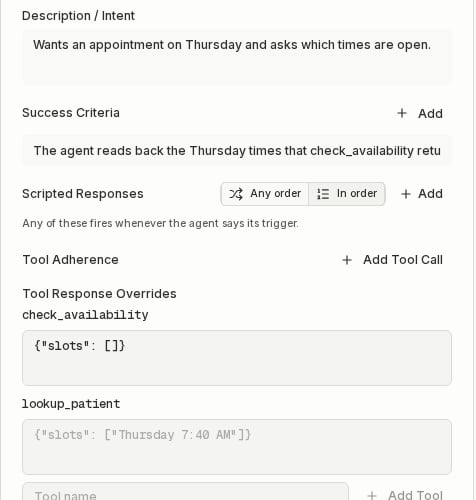
Example
Your scheduling agent hascheck_availability and lookup_patient. You want to test that it reads back the times your calendar returns.
- Turn on Mock tool calls in the agent’s Simulation Settings.
- Set
check_availabilityto Fixed with{"slots": ["Thursday 7:40 AM", "Thursday 4:05 PM"]}. Leavelookup_patienton Generated. - Create a Digital Human who asks for a Thursday appointment, with the success criterion “The agent reads back the Thursday times that check_availability returned.”
check_availability of {"slots": []}.
Set up by platform
“Native” means you only turn on Mock tool calls. “Your tool server asks Bluejay” means your tool handler calls the resolver before it runs the real tool.
ElevenLabs
Bluejay mocks ElevenLabs agents natively on web and chat simulations. Your agent needs versioning turned on in ElevenLabs. When you turn mocking on, Bluejay creates a branch namedbluejay-mocks on the agent in your ElevenLabs workspace.
- The branch is a copy of your live version. It has a client tool in place of each webhook tool, with the same name and schema. Tools on Real backend stay webhooks and call your server.
- The branch takes 0% of traffic. Live callers and your main version are never touched.
- Bluejay reuses the branch for every run. When you publish a new live version, Bluejay rebuilds the branch the next time you queue a run. Changing a tool to or from Real backend rebuilds it right away.
- Don’t edit the branch. Bluejay overwrites it.
X-Simulation-Result-Id on every SIP call. Pass it to your tool webhook as a dynamic variable.
Google CES and Dialogflow CX
When Google hands a tool call to Bluejay during a simulation, Bluejay answers it. This works for voice and chat.- A tool on Real backend gets an error result, since nothing can run your real tool on this path.
- A result that is not a JSON object arrives as
{"result": <value>}. - Tools that Google runs itself, such as OpenAPI tools, still call your real system. Bluejay can’t mock them yet.
Retell, Vapi and other platforms
Your tool server asks Bluejay for the mock before it runs the real tool.- Read the Bluejay test id from the call.
- Call
POST /v1/tool-mocks/resolvewith your Bluejay API key. - If
mockedis true, returnresultand skip the real tool. Onmocked: false, run the real tool.
A Retell custom function with FastAPI:
- Only call Bluejay when the call has a test id or comes from a Bluejay number. Real callers then never wait on Bluejay.
- When the call has a test id and Bluejay errors or times out, return an error result instead of running the real tool, so a test never reaches your real backend. Generated results can take a few seconds, so wait up to 10.
Phone
No platform routes a Bluejay caller to a test version on its own, so phone tests always need your tool server to ask Bluejay. Use the resolver or the SDK helper.- SIP calls carry
X-Simulation-Result-Id. Send it astest_result_id. - Phone calls drop SIP headers. Send the Digital Human’s phone number as
caller_number, in E.164 form. Bluejay matches it to the Digital Human calling from that number right now. - When your agent calls the Digital Human, the Digital Human’s number is the number your agent dialed.
LiveKit and Pipecat
When your tools run in your own code, wrap each tool with the Bluejay SDK helper. During a Bluejay simulation it returns the mocked result. On any other call it runs your real tool.@mockable under @function_tool, and call bind_livekit(ctx) at the start of your entrypoint.
@mockable(name="check_availability").
For Pipecat, bind the call when the bot starts, then wrap the handler body with mock_or_call.
bind_livekitreadsX-Simulation-Result-Idfrom the dispatch metadata, then from participant attributes. For SIP calls into LiveKit, map the header withheaders_to_attributeson your inbound trunk.- On plain phone calls the header is dropped, so
bind_livekitfalls back to the caller’s number,sip.phoneNumber. - In any other server, call
bind(test_result_id=...)orbind(caller_number=...)yourself.
API and MCP
The endpoints authenticate with your Bluejay API key in theX-API-Key header. They only see agents and simulations in the workspaces your key can access.
With MCP or Bluejay AI, ask “mock tool calls for my scheduling agent”, then “make check_availability return Thursday 7:40 AM and 4:05 PM”. The tools are set_agent_mock_tools and set_agent_tool_mock.
Turn mocking on or off
PUT https://api.getbluejay.ai/v1/agents/{agent_id}/mock-tools
Needs write access to the agent’s workspace.
Each tool setting:
For ElevenLabs agents, a 400 means the agent has no versions, so turn on versioning in ElevenLabs first. A 502 means a call to the ElevenLabs API failed, and mocking stays as it was. Queuing a voice run also updates the branch to match the live agent and its tools. If that update fails, the run is not queued and the queue request answers 502.
The MCP tool
set_agent_mock_tools takes agent_id and enabled, and returns the same fields.
Set one tool
PUT https://api.getbluejay.ai/v1/agents/{agent_id}/mock-tools/{tool_name}
The body is one tool setting, such as {"mode": "fixed", "response": {"slots": []}}. It also turns mocking on for the agent, and returns the same fields as above. The MCP tool is set_agent_tool_mock.
Digital Human overrides are the tool_responses field, an object keyed by tool name, when you create or update a Digital Human.
Resolve a mock
POST https://api.getbluejay.ai/v1/tool-mocks/resolve
Call it from your tool server before you run the real tool.
Send
description and the schemas to mock a tool without registering it in Bluejay. Each one takes precedence over what Bluejay has stored for that tool, so the mock stays in step with your code.
- When the call is a Bluejay simulation and Bluejay can’t produce a result, the answer is
mocked: truewith the result{"error": "This tool is unavailable in this test."}. caller_numbermatches the Digital Human with that number whose conversation is running now. If none is running, the answer ismocked: false.- An unknown id, an id from another organization, and an id from a workspace your key can’t read all answer
mocked: false. Bluejay never reveals whether the id exists. - The limit is 600 requests per minute per organization. Over it, the endpoint answers 429. Treat a 429 like any other error: return an error result when the call has a test id, otherwise run the real tool.
SDK helper
The helpers are inbluejay.helpers.tool_mocks in the bluejay-sdk Python package.
The helper fails closed on tests:
- A call with no test id and no caller number never contacts Bluejay.
- With a test id, a lookup that fails, times out, or answers 429 returns
{"error": "This tool is unavailable in this test."}. Your real tool never runs. - With only a caller number, the call may be a real caller, so a failed lookup runs your real tool.
- A mocked result is returned as a string. Objects are JSON-encoded.