

How it works
Mocking is set on the agent and applies to every simulation on that agent. Live traffic is never mocked.- Open the agent’s Simulation Settings and turn on Mock tool calls. Every tool the agent has is listed.
- Pick a mode for each tool. Tools start on Generated.
- Run a simulation. Each tool call gets its answer from Bluejay.

How the answer reaches your agent depends on the platform. ElevenLabs web and chat agents, and Google CES or Dialogflow CX tools that Bluejay runs, are mocked automatically. ElevenLabs phone and SIP, Retell, Vapi, Bland and custom agents need their tool server to ask Bluejay. See Setup by provider.
Override a tool for one test case
A Digital Human can override what a tool returns in its own runs. Edit the Digital Human and fill in Tool Response Overrides for the tool, JSON or plain text. Leave it empty to use the agent’s mode.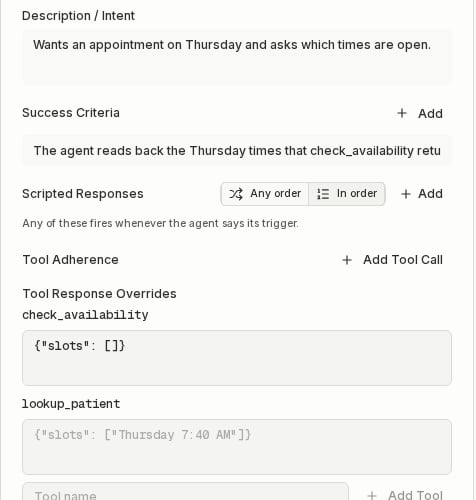
Example
Your scheduling agent hascheck_availability and lookup_patient. You want to test that it reads back the times your calendar returns.
- Turn on Mock tool calls in the agent’s Simulation Settings.
- Set
check_availabilityto Fixed with{"slots": ["Thursday 7:40 AM", "Thursday 4:05 PM"]}. Leavelookup_patienton Generated. - Create a Digital Human who asks for a Thursday appointment, with the success criterion “The agent reads back the Thursday times that check_availability returned.”
check_availability of {"slots": []}.
With the API or MCP
Turn mocking on, then set a tool to Fixed:tool_responses field, an object keyed by tool name, when you create or update a Digital Human.
With MCP or Bluejay AI, ask “mock tool calls for my scheduling agent”, then “make check_availability return Thursday 7:40 AM and 4:05 PM”. The tools are set_agent_mock_tools and set_agent_tool_mock.