

The Idea in One Paragraph
Your best QA engineer already knows what a passing conversation looks like. The problem is that their judgment lives in one person’s head and cannot scale to thousands of conversations. The Metrics Lab is how you clone that judgment into the evaluator. Your reviewer annotates a representative set of conversations with the correct outcome, Bluejay measures where the AI disagrees with them, and you improve the metric until the two agree. Once they agree on your sample, the metric carries your reviewer’s standard onto every new conversation automatically.Human in the Loop
Most automated evaluation hands the entire decision to a generic model and hopes it matches your standard. The Metrics Lab does the opposite. Your reviewer stays in the loop the whole time, and their annotations are the ground truth that the metric is tuned against.Your standard, not a generic one
The metric is graded against your reviewer’s verdicts, so it encodes how your team defines a good conversation rather than how a generic LLM guesses.
Decision making that scales
One reviewer annotates a sample, and the aligned metric applies that same judgment to thousands of conversations.
A defensible record
Your annotations are a concrete record of how your team grades conversations. New hires can review it, and auditors can review it.
Evaluations you trust
Because the metric is measured against human verdicts, the dashboard reflects reality and not a model’s intuition.
How Alignment Works
The loop is the part that does the work. Each pass closes the distance between the AI’s verdict and your reviewer’s verdict. When the two agree across the sample, measured by the alignment score, the metric is ready to leave the lab.Why a Sample Generalizes
Alignment rests on one assumption: the conversations you annotate are a fair cross section of the conversations you actually receive. If your sample covers the scenarios that occur in production, including the borderline ones, then a metric tuned to match human verdicts on that sample keeps matching them on new conversations. If your sample is skewed, the tuning will be skewed too. A short rule of thumb when you build the sample:- Include obvious passes and obvious fails so the metric has clear anchors.
- Include the ambiguous middle, because that is where the AI and your reviewer disagree most often.
- Cover each Digital Human intent or production scenario you care about.
Walkthrough
1. Create a Lab
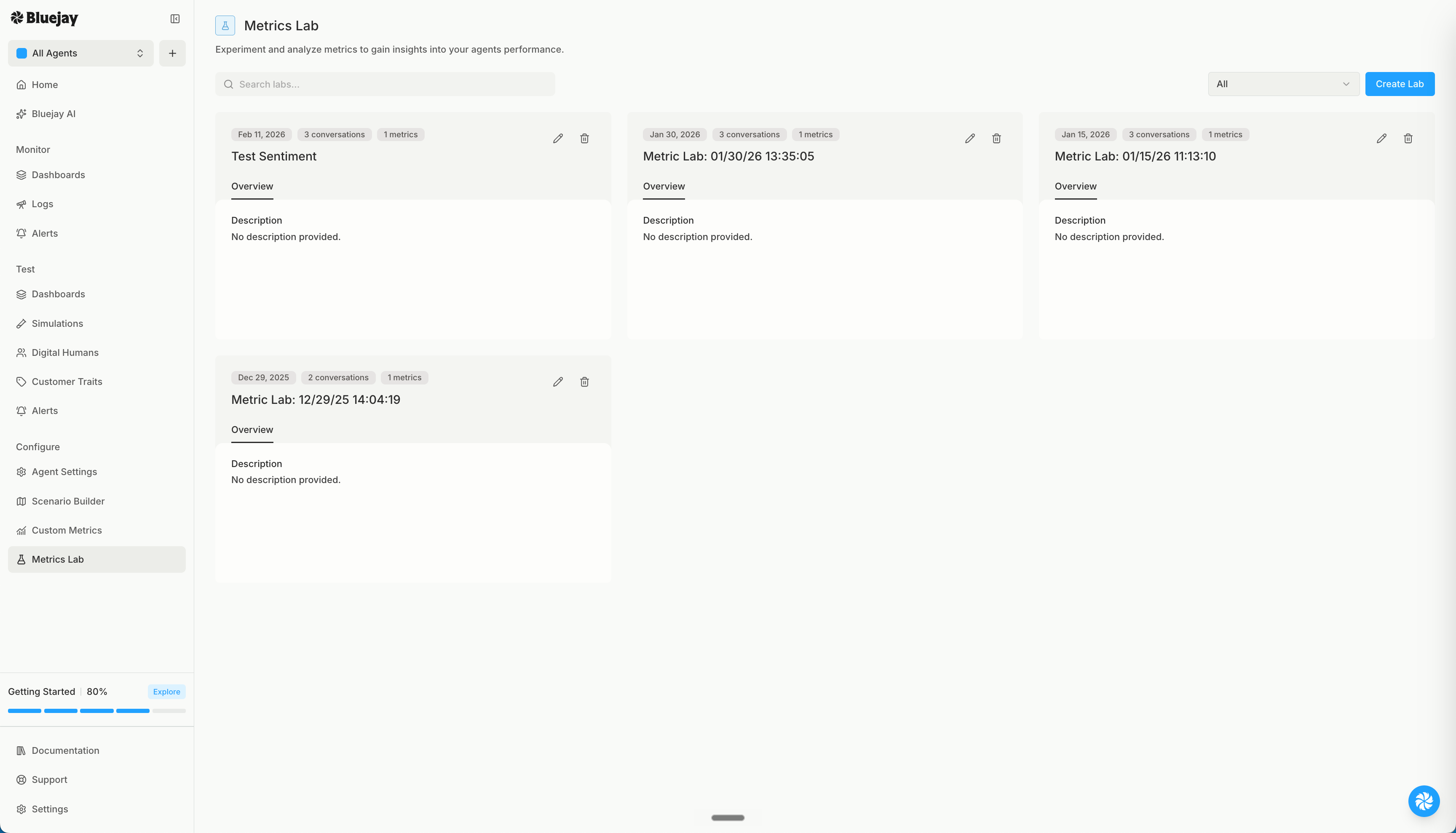
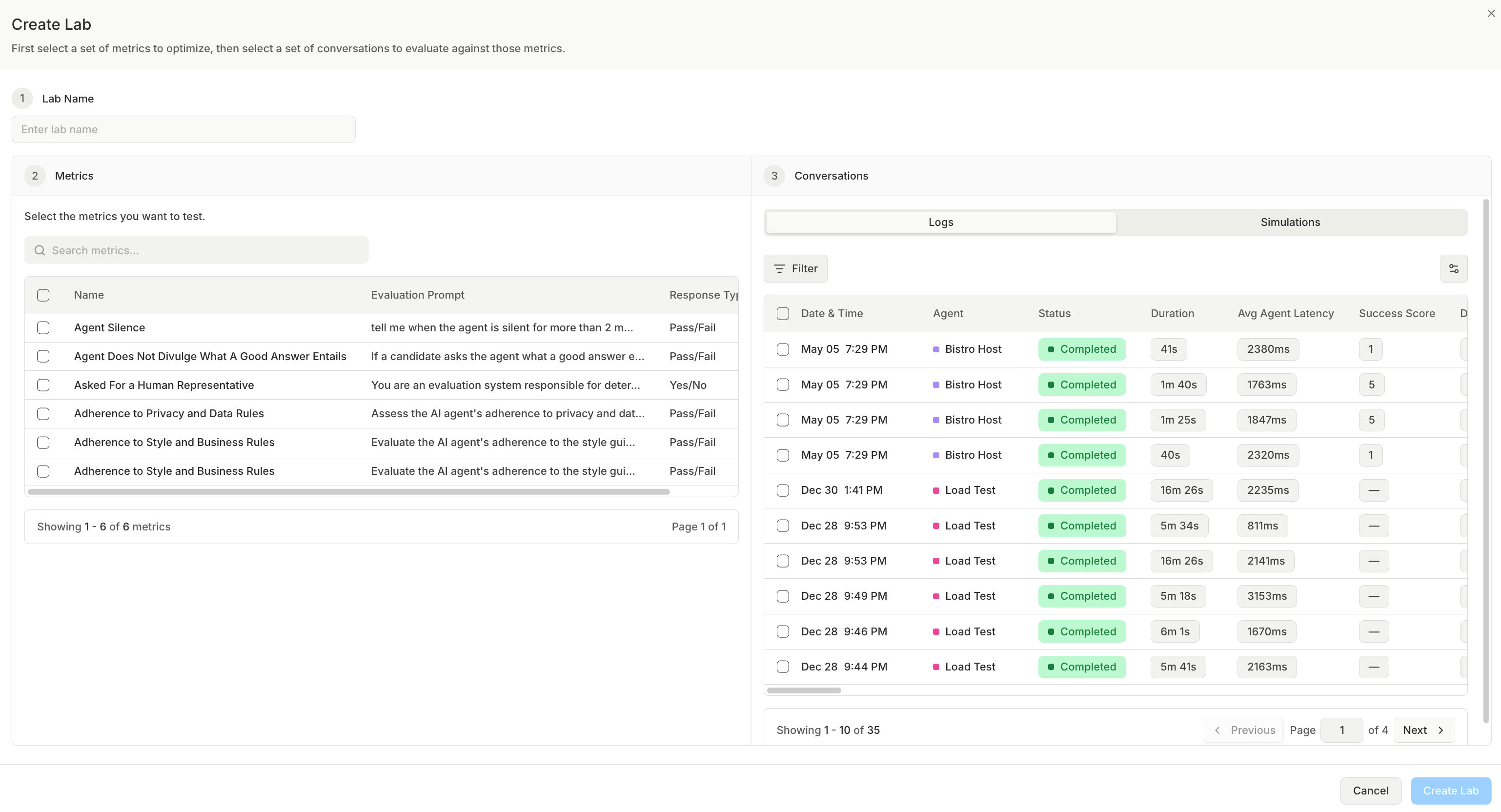
From the Metrics Lab page, click Create Lab. The dialog walks you through three steps:- Lab Name. Name the lab after what you are validating, for example “Identity Verification Standard.”
- Metrics. Select one or more Custom Metrics to optimize. These are the metrics the lab will tune against your annotations.
- Conversations. Select the conversations to bring in. You can pull from your agent’s Conversations or from a Simulation run.
2. Annotate the Conversations
Open the Annotate tab. You see a table with one row per conversation and one column per metric. Each metric column is split into an AI verdict and a Human verdict, side by side.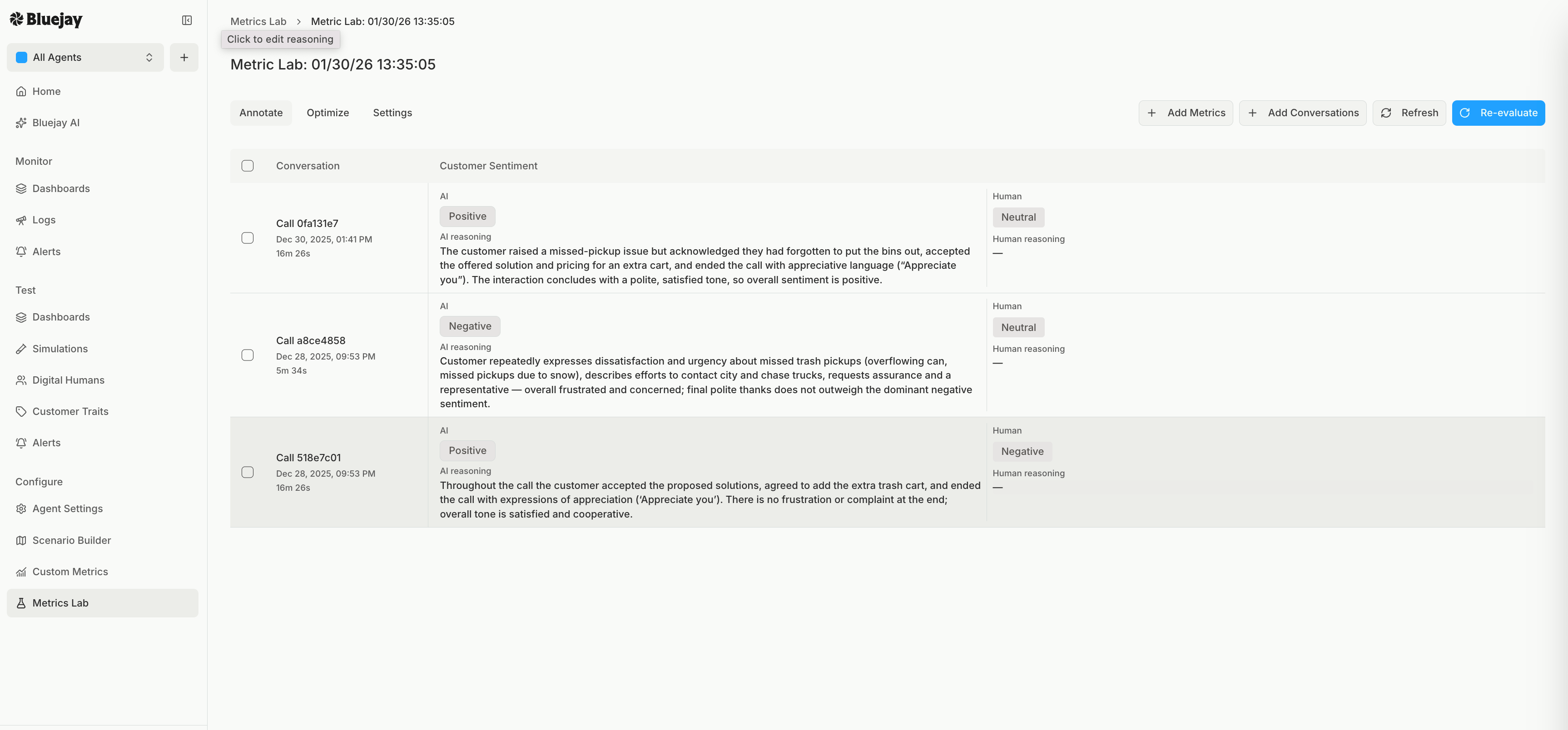
- Transcript tab shows the full conversation so the reviewer can read it.
- Details tab shows each metric with the AI verdict on the left and the Human input on the right.
- Pass / Fail and Yes / No metrics use simple buttons.
- Quantitative metrics take a numeric score within the metric’s range.
- Enum metrics use a dropdown of your defined options.
- Qualitative and JSON metrics take free text.
Annotate every conversation in the sample before moving on. The alignment score is only meaningful once the AI has a human verdict to compare against on each conversation.
3. Improve and Optimize
Open the Optimize tab and select the metric you want to tune. At the top you see the Alignment score, the percentage of conversations where the AI verdict matches your reviewer’s annotation.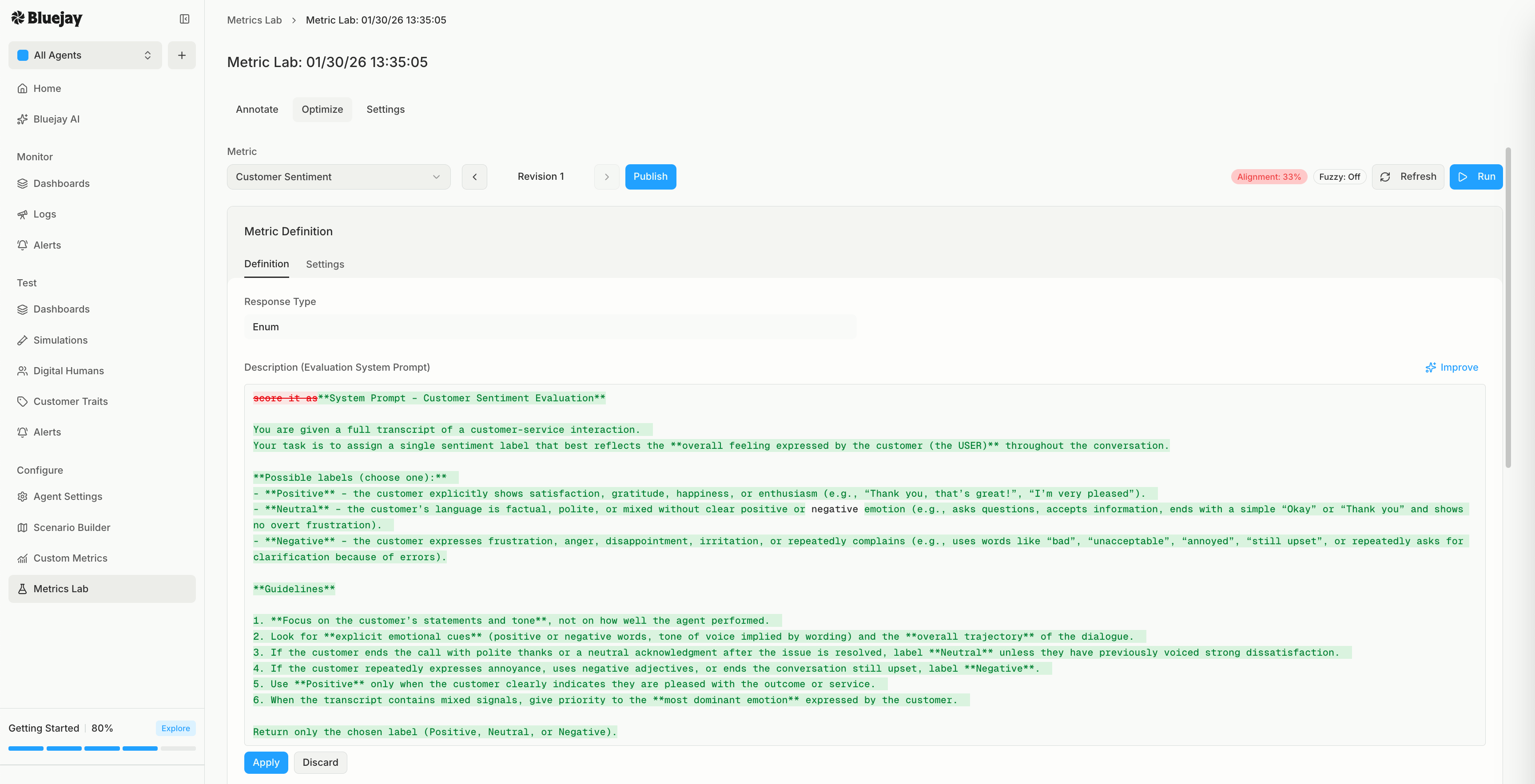
- Improve asks Bluejay to rewrite the metric prompt based on where the AI and human verdicts disagree. You can add optional instructions, and you review the suggested change as a diff before accepting it.
- Edit the metric definition by hand. Adjust the description, model, evaluation route, or temperature directly.
4. Publish to Production
Once alignment is where you want it, click Publish. The revision becomes the live definition of the metric, and every future simulation and production evaluation grades conversations with your reviewer’s standard baked in.Fuzzy Alignment for Scored Metrics
For quantitative metrics, an exact match is often too strict. A human score of 3 out of 5 and an AI score of 4 out of 5 are close enough to count as agreement in most cases. Open the Settings tab and turn on Fuzzy Alignment, then set a Numerical Score Threshold. Scores within that many points of each other count as aligned. For example, with a threshold of 1, an AI score of 2 and a human score of 3 count as a match.Keep the Lab Alive
Alignment is not a one time event. As new edge cases appear in production, add them to the lab and keep your reviewer’s judgment current.- Add Conversations brings new conversations into the lab. Toggle on evaluation so they are scored against the current metrics as they land.
- Add Metrics brings another metric into the same lab.
- Re-evaluate re-scores every conversation with the latest metric definitions.
A Worked Example
Imagine a Pass / Fail metric for “Identity Verified Before Sharing Account Details.” Out of the box the AI is generous: it passes conversations where the agent confirmed only a name, even when policy requires two factors. Your reviewer annotates fifty conversations. Twenty are clear passes with two factors confirmed. Twenty are clear fails with no verification at all. Ten are borderline, where the agent confirmed one factor and the customer volunteered another. Your policy says the agent must explicitly request both, so your reviewer marks all ten as fail. The alignment score comes back low because the AI passed those ten borderline conversations. You click Improve, accept a revision that tightens the threshold to “agent explicitly requested two factors,” and click Run. The AI now fails the borderline conversations just like your reviewer did, and the alignment score jumps into the green. You Publish, and the metric flags the same gap consistently across thousands of conversations, with verdicts that match what your team would have said. That is the whole point of the Metrics Lab: a metric that is close becomes a metric that is right, and your reviewer’s judgment scales to every conversation.Next Steps
Custom Metrics
Understand the metrics that the lab tunes.
Custom Metrics Prompting Guide
Learn the prompt patterns that make alignment converge faster.
Metric Types
Pick the right response type for each measurement goal.
Create Custom Metric API
Define a metric programmatically before bringing it into the lab.